
Jeeto92 Game Login
Getting into your Jeeto92 account is normally a matter of seconds. Every so often, though, the OTP takes its time or the password just won’t come to mind. We’ve all been there.
So here’s the whole picture – how to sign in, the login methods on offer, recovering a password, sorting out common errors, and keeping your account locked down.
The Quick Basics
| Item | Detail |
|---|---|
| Log In With | Mobile number + password, or an OTP by SMS |
| OTP Login | A one-time code in place of a password |
| 2-Step Login | Optional, but well worth turning on |
| Use On | The app or any browser |
| Lost Password | Reset it from the sign-in screen using an OTP |
| Duration | Under a minute, as a rule |
| Support | 24/7 live chat |
Why Logging In Matters
Signing in is far more than a formality – it’s the door to your entire account. Get through it and you’ve got:
- Your PKR wallet – balance, winnings, and bonus funds.
- Every one of the 50+ games – colour prediction, Aviator, slots, cards, and the rest.
- Withdrawals – move your cash out via JazzCash or Easypaisa.
- Daily bonuses – login rewards that only land on your account.
- Referrals and VIP – keep tabs on your invites and tier progress.
- Your records – past games and transaction history.
The Login Methods
Jeeto92 hands you a few ways to get in, so go with whatever feels easiest:
- Phone + OTP – the firm favourite. Type your number, a one-time code arrives by SMS, and you’re through. Nothing to memorise.
- Phone + password – the old-fashioned route. Enter your registered number and password for instant entry.
- WhatsApp number – on certain versions, the number you signed up with works for login as well.
The same encryption guards all of them, so it really comes down to convenience.
How to Log In
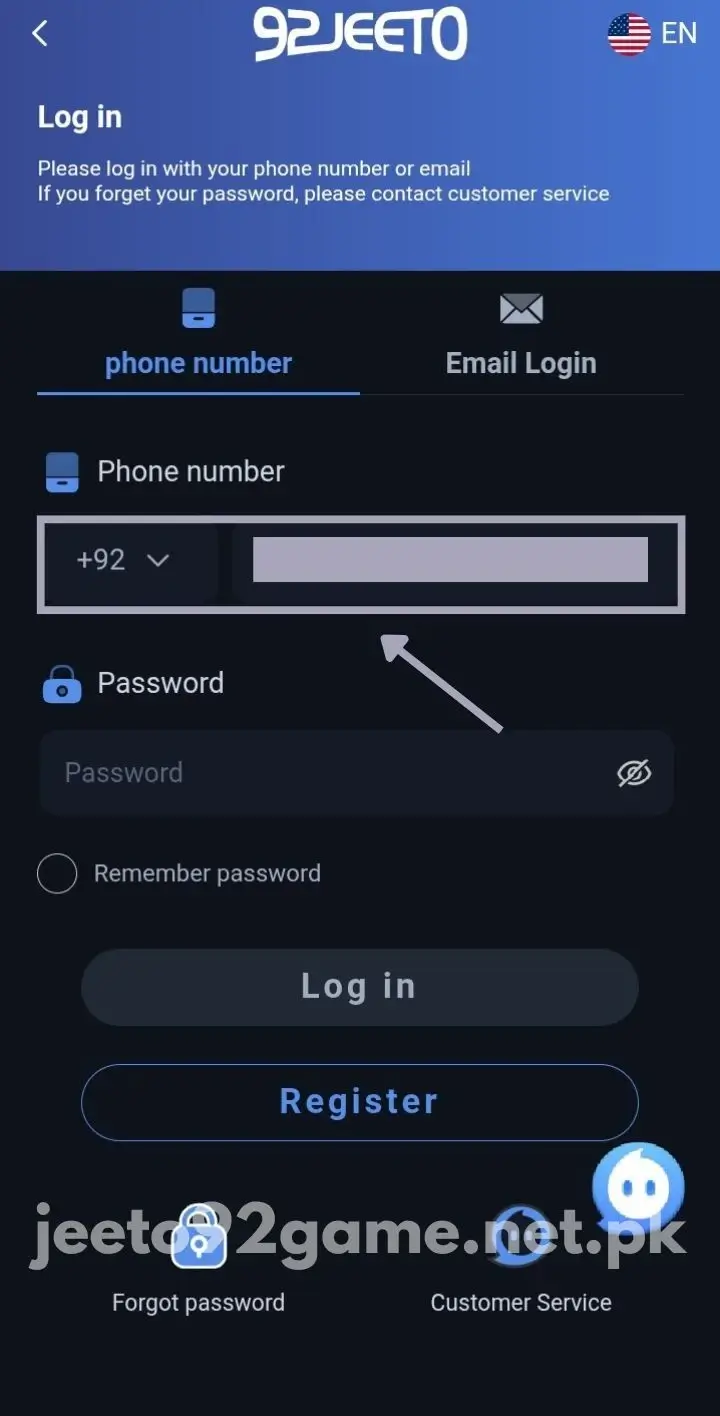
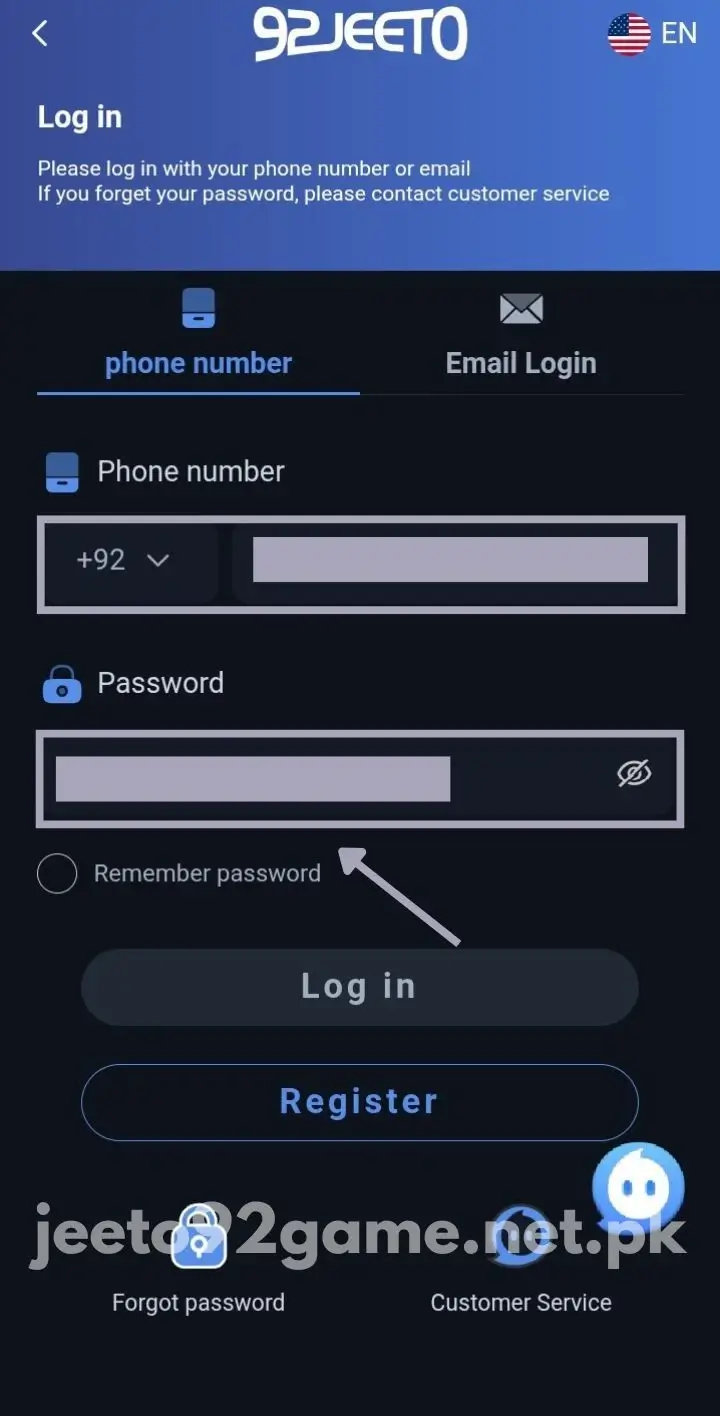
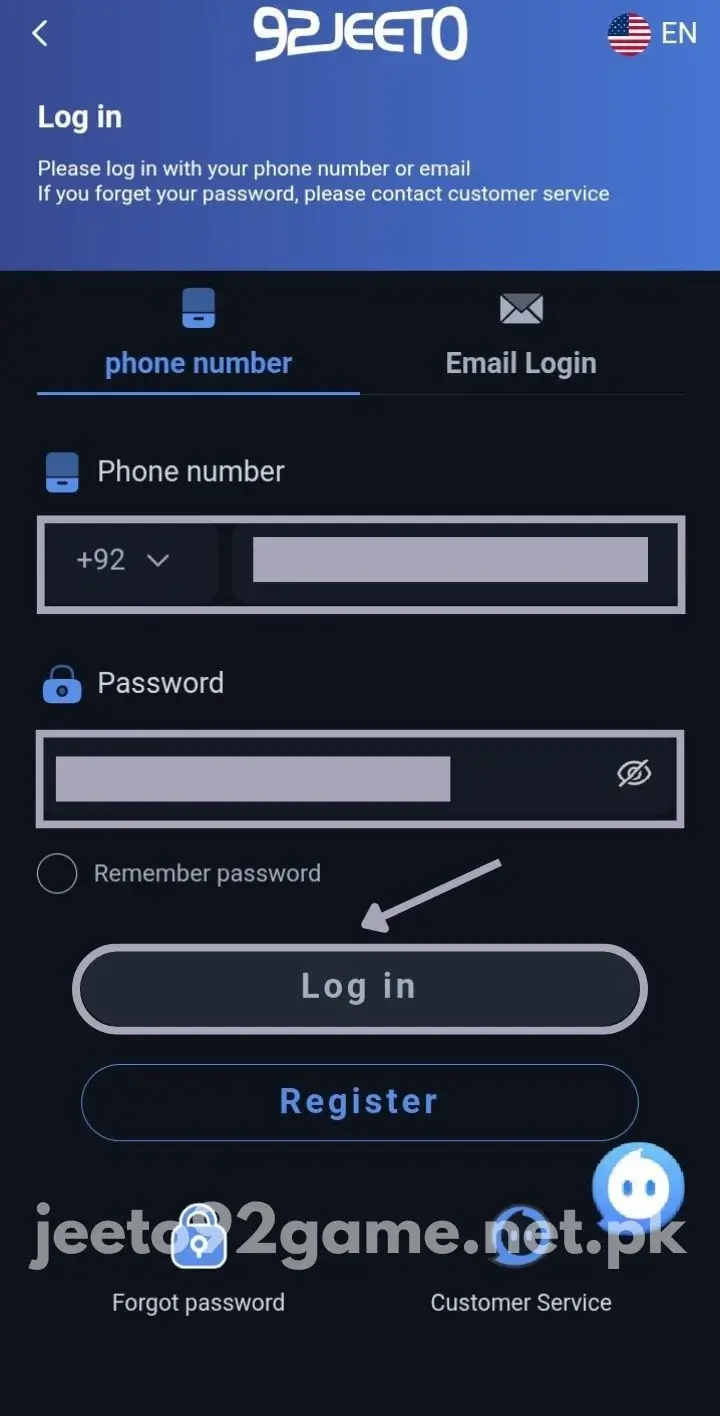
It’s quick, truthfully:
- Open the Jeeto92 app, or pull up the site in a browser.
- Press Login.
- Enter the mobile number you registered with (+92).
- Enter your password – or tap “Login with OTP” for a one-time SMS code instead.
- If a verification prompt shows up, key in the code.
- And that’s you in – the dashboard loads, ready for play.
No account yet? Get going on the registration page.
Forgot Your Password? No Stress
Happens to the best of us. Here’s the way back:
- Tap “Forgot Password” beneath the sign-in fields.
- Put in the number registered to your account.
- An OTP turns up – type it in fast, since it lapses quickly.
- Pick a new password, and stash it somewhere safe this time.
- Log in again with the fresh one.
If the code is slow to arrive, give it a minute before requesting another.
Logging In on PC and iPhone
Not on Android? That’s fine. Just open the browser version on your PC or iPhone and sign in with the very same details. On a computer, an emulator can run the app as well.
Whatever the device, your account, balance, and bonuses stay identical. One thing to note – only one session runs at a time, so signing in on a new device boots you off the old one.
When Login Won’t Work
If you’ve hit a wall, it’s usually one of these – and each has an easy fix:
- Wrong password – Check the caps lock and have another go. Changed it lately? Use the new one. Too many wrong tries can lock the account for around 15 minutes.
- OTP not arriving – Hang on a minute, check your signal, and see your SMS inbox has room. Then ask for a new code.
- App crashes during login – Wipe the app cache, grab the latest build, or reinstall it.
- Account locked – Five failed goes can lock it briefly. Wait 15–30 minutes, then retry or reset your password.
- Still stuck? – Reach support over live chat; they handle login trouble quickly.
A Few Login Tips
A handful of small habits make things smoother:
- Keep your password somewhere safe – phone notes or a notepad both work.
- Steer clear of public WiFi for login, especially ahead of a deposit or withdrawal.
- Confirm you’re using the real app or site, not some copycat.
- Sign out when you’ve finished on a shared device.
Keeping Your Account Safe
There’s real money tied up in this account, so look after it. Use a strong password – eight characters or more, with letters, numbers, and a symbol – and don’t recycle it from another site.
Enable two-step login (2FA) where possible. Then, even with a leaked password, no one can enter without the code sent to your phone.
And never pass your number, password, or OTP to anyone – not even someone posing as support. The real team will never ask for them.
If You Think Someone Got In
Noticed a login you don’t recognise, or an OTP you never asked for? Move fast:
- Change your password straight away to a brand-new one.
- Switch on 2FA if it isn’t already running.
- Contact support via live chat and flag it.
- Scan your history for any wagers or withdrawals that aren’t yours.
- Lock down your phone too – a screen PIN and a SIM PIN both help.
A Quick Note on Verification
The good news – mostly you just need your number plus a password (or OTP) to log in. No social login required.
Sign in from a new device or place, though, and the app might ask for an extra OTP just to confirm it’s really you. And bear in mind your withdrawal password is a separate thing from your login password – that second one keeps your cash protected.
Last Word
Enter the right details and you’re inside Jeeto92 within seconds. And if the password slips your mind, the reset takes about a minute.
Snagged on something else? Support is on hand all day over live chat. Still need the app? Grab it from the download page.
FAQs
What do I need to log in to Jeeto92?
Simply the mobile number you signed up with and your password. Prefer a code by SMS? OTP login covers that too.
Can I log in on more than one device?
Yes, though just one session runs at any moment. Sign in on a fresh device and the previous one gets logged out.
I forgot my password. Will I lose my balance?
Not at all. The “Forgot Password” reset only returns your access – your balance sits untouched.
Why is my OTP not coming?
Nearly always a signal issue. Give it a minute, double-check the number and inbox, then resend the code.
Why does my login keep failing?
Typically a mistyped password, a lapsed OTP, or a shaky connection. Sort those out and it’ll work. Repeated wrong attempts can lock the account for a while.
Can I log in with my email instead of phone?
Generally your mobile number is the login. A few versions accept email, yet the number remains the primary one.
Is it safe to log in on public WiFi?
Everything’s encrypted, but public WiFi is best avoided for logging in – particularly around a deposit or withdrawal. Mobile data is the safer bet.
What’s the difference between login and withdrawal password?
The login password unlocks your account. A separate withdrawal password shields your money whenever you cash out.
What if I got locked out?
A run of wrong attempts locks it for roughly 15 minutes. Sit tight, then retry or reset the password.
Can support ask for my password?
Never. Anybody requesting your password or OTP is out to scam you – keep those details private.